ERPNext Version 16 Explained: Features, Performance Improvements & Upgrade Guide (2026)
ERPNext Version 16 introduces powerful upgrades in accounting, manufacturing, inventory, HR, and performance. Explore every major feature and learn whether your business should upgrade.
ERPNext Version 16 Explained: Every Major Feature, Performance Gain, and What the Upgrade Means for Your Business
Introduction
ERPNext version 16 landed on 12 January 2026, and it arrived after one of the longest development cycles in the product’s history. Roughly two years separated it from the last major stable release, and Frappe has described it as the most stable and secure version of ERPNext shipped so far. It carries contributions from a global community of more than 600 developers and introduces over 50 new features across accounting, manufacturing, stock, subcontracting, and point of sale.
Six months on, version 16 has continued to mature through a steady stream of patches and refinements on the version-16 branch. That matters for anyone weighing an upgrade. A release that has been in the field for two full quarters, with real production traffic behind it, is a very different proposition from a release note published on day one.
This article walks through what actually changed, module by module, and then answers the question every finance head and operations director eventually asks: should we upgrade now, and what does the upgrade path look like?
If you are evaluating this for a live implementation, the short version is that v16 is the first release in a while where the headline improvements are not cosmetic. The gains sit in three places: financial reporting flexibility, manufacturing planning depth, and raw system performance.
ERPNext v16 Accounting Features
1. Financial Report Templates: custom P&L and Balance Sheet layouts
This is the single most requested capability we hear from Indian finance teams, and v16 finally delivers it properly.
Standard financial statements in earlier versions were fixed in structure. If your auditor wanted a particular grouping, if you needed an IFRS-aligned layout, or if a regional compliance format demanded a specific schedule, you were either living with a workaround or paying for a custom report.
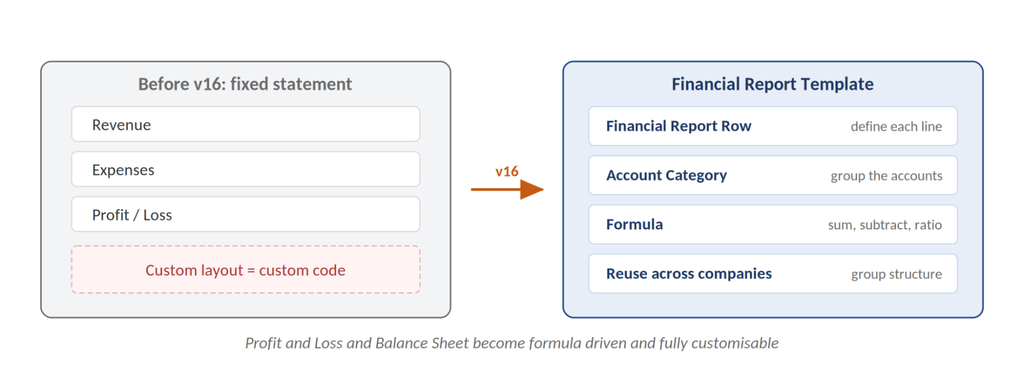
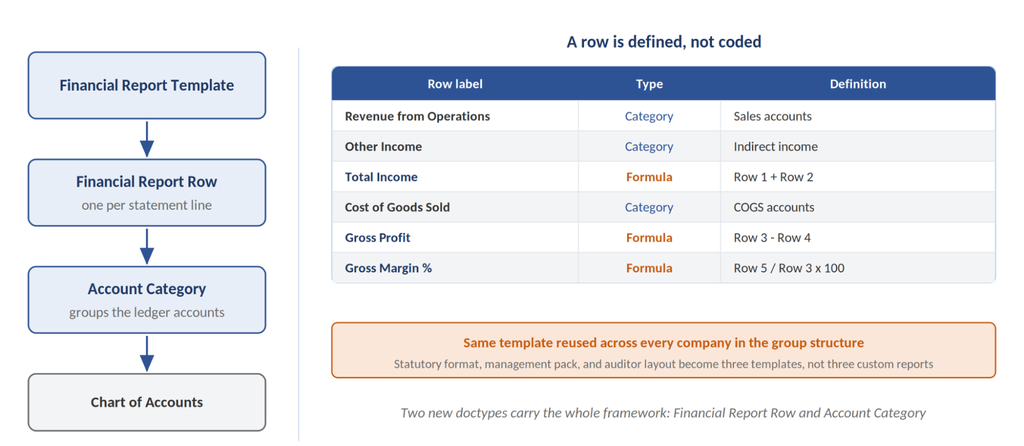
Version 16 introduces a financial report template framework, supported by two new doctypes, Financial Report Row and Account Category. Profit and loss and balance sheet statements become formula-driven and fully customisable. You define the rows, you define the calculations, and you reuse the template across companies in a group structure.
Why this matters commercially: every ERPNext implementation we deliver uses budget effort for at least one or two custom financial statements. That effort now largely disappears into configuration.
2. Purchase Expense Booking in the purchase cycle
Working out the true cost of goods sold has always involved a degree of reconstruction. Purchase costs sat in places that did not surface cleanly in reporting, and finance teams reconciled manually.
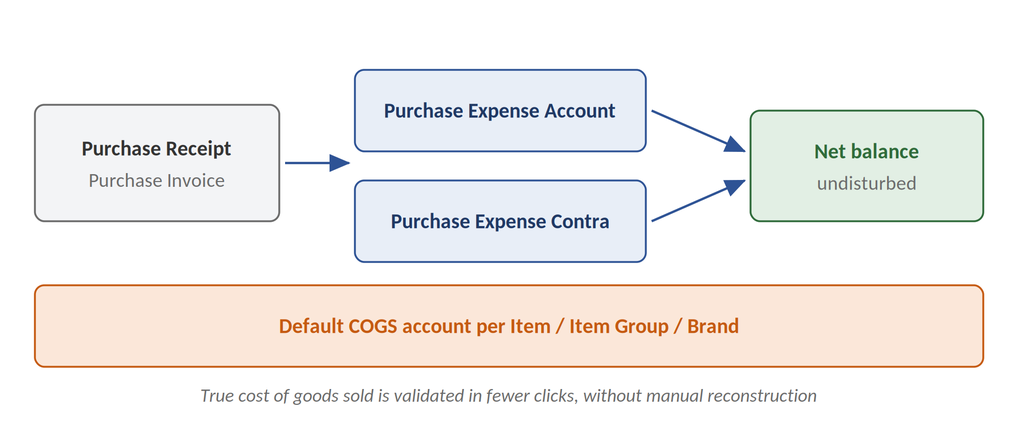
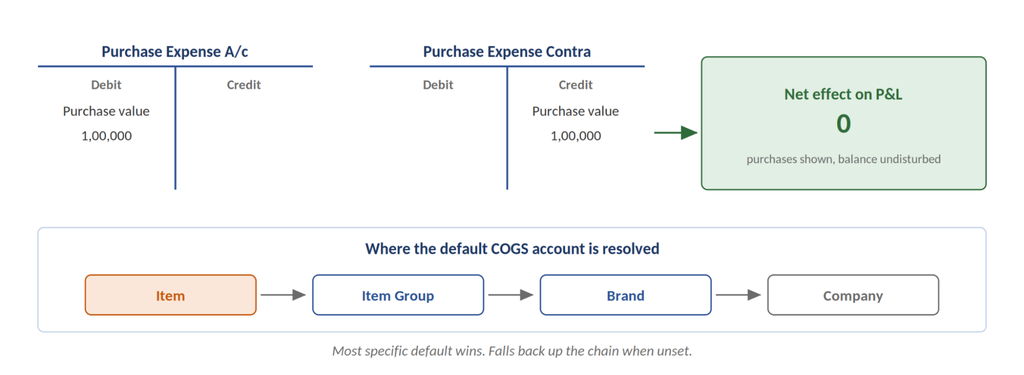
v16 adds Purchase Expense Account and Purchase Expense Contra Account at the company and item defaults level. Purchase receipts and invoices can now be presented as purchases in financial reports without disturbing the net balance. You can also set a default COGS account per item, item group, or brand.
The practical effect is that validating COGS takes fewer clicks and produces fewer arguments between finance and operations.
3. Automatic Closing Stock Posting for periodic inventory
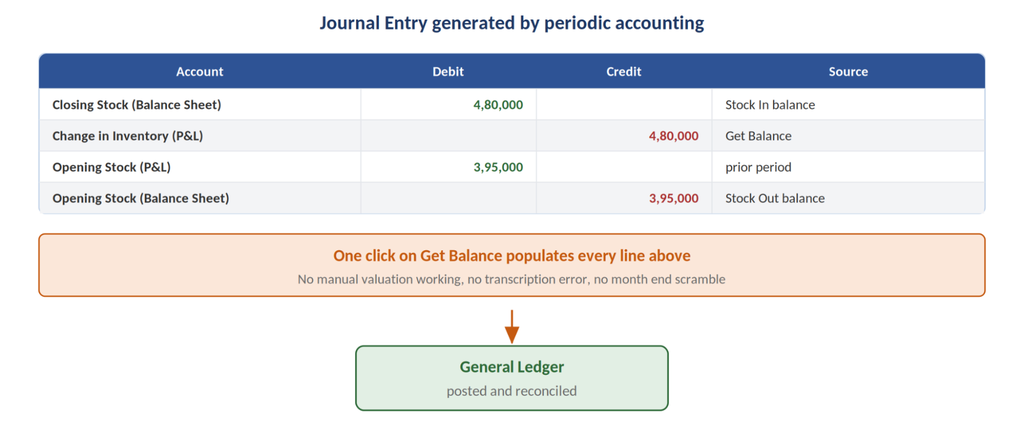
Businesses using periodic inventory accounting have historically endured a painful month end. Calculate stock values, reconcile against accounts, pass the journal entry, and hope nobody fat-fingered a number.
v16 adds a periodic accounting feature that lets companies record stock-in and stock-out balances through journal entry. Press “Get Balance” and the stock differences post directly to the general ledger.
4. Consolidated Trial Balance across group companies
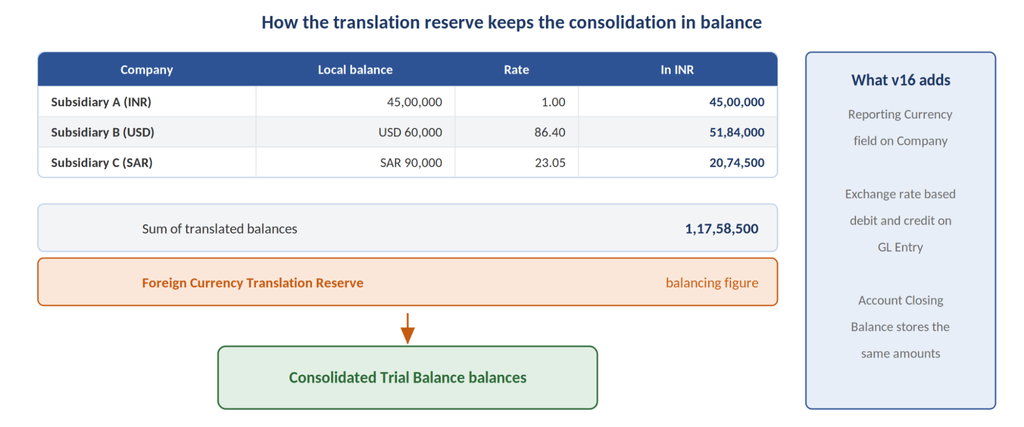
Multi-entity groups previously pulled reports from each subsidiary, handled currency conversion by hand, and merged the results in a spreadsheet.
The new Consolidated Trial Balance report displays combined account balances for selected companies in a single view. Figures from different company currencies are converted into the parent’s reporting currency, and any exchange rate gap is recorded in a Foreign Currency Translation Reserve line so the totals still balance.
Related to this, the company now carries a Reporting Currency field, and GL Entry and Account Closing Balance records store exchange rate-based debit and credit amounts in that currency.
5. Reporting and ledger refinements worth knowing
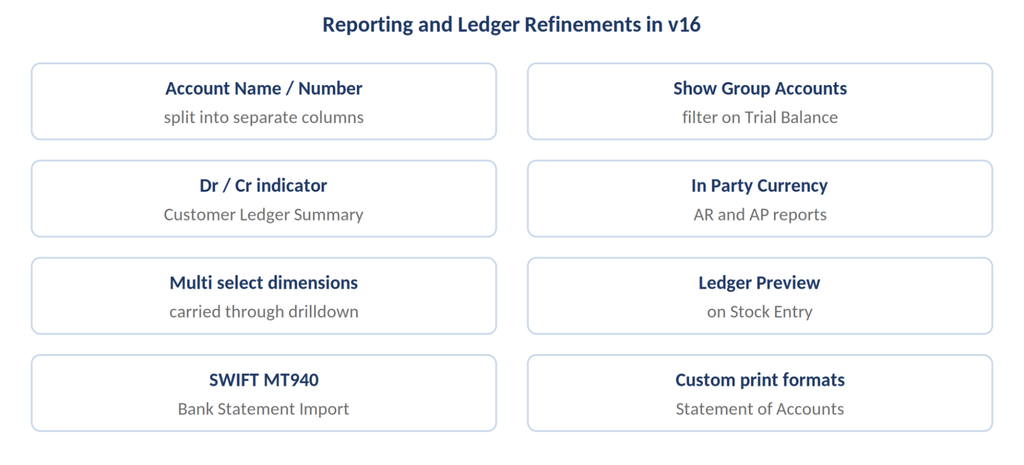
Additional reporting enhancements include:
- Trial Balance, Balance Sheet, and Profit and Loss exports now separate Account Name and Account Number into distinct columns.
- Trial Balance gains a Show Group Accounts filter so you can strip out group rows and see only individual ledger accounts.
- Customer Ledger Summary shows a clear Dr/Cr indicator on the closing balance.
- Accounts Receivable and Accounts Payable reports support an in-party currency option, letting you view balances in the customer’s or supplier’s currency.
- Accounting dimension filters were added to Customer Ledger Summary and Supplier Ledger Summary, and dimension filters on several core reports became multi-select, carrying your selection through when you drill down.
- Stock Entry gains a ledger preview, so you can inspect the expected accounting and stock ledger impact before submitting.
- Bank Statement Import now accepts SWIFT MT940 files.
- The Process Statement of Accounts supports custom print formats and custom HTML layouts for General Ledger and Accounts Receivable outputs.
ERPNext v16 Manufacturing Features
This is where v16 earns its keep for discrete and process manufacturers, and it is the area we field the most questions about from clients in Pune, Ludhiana, and the wider Indian engineering belt.
1. Material Requirements Planning as a first-class workflow
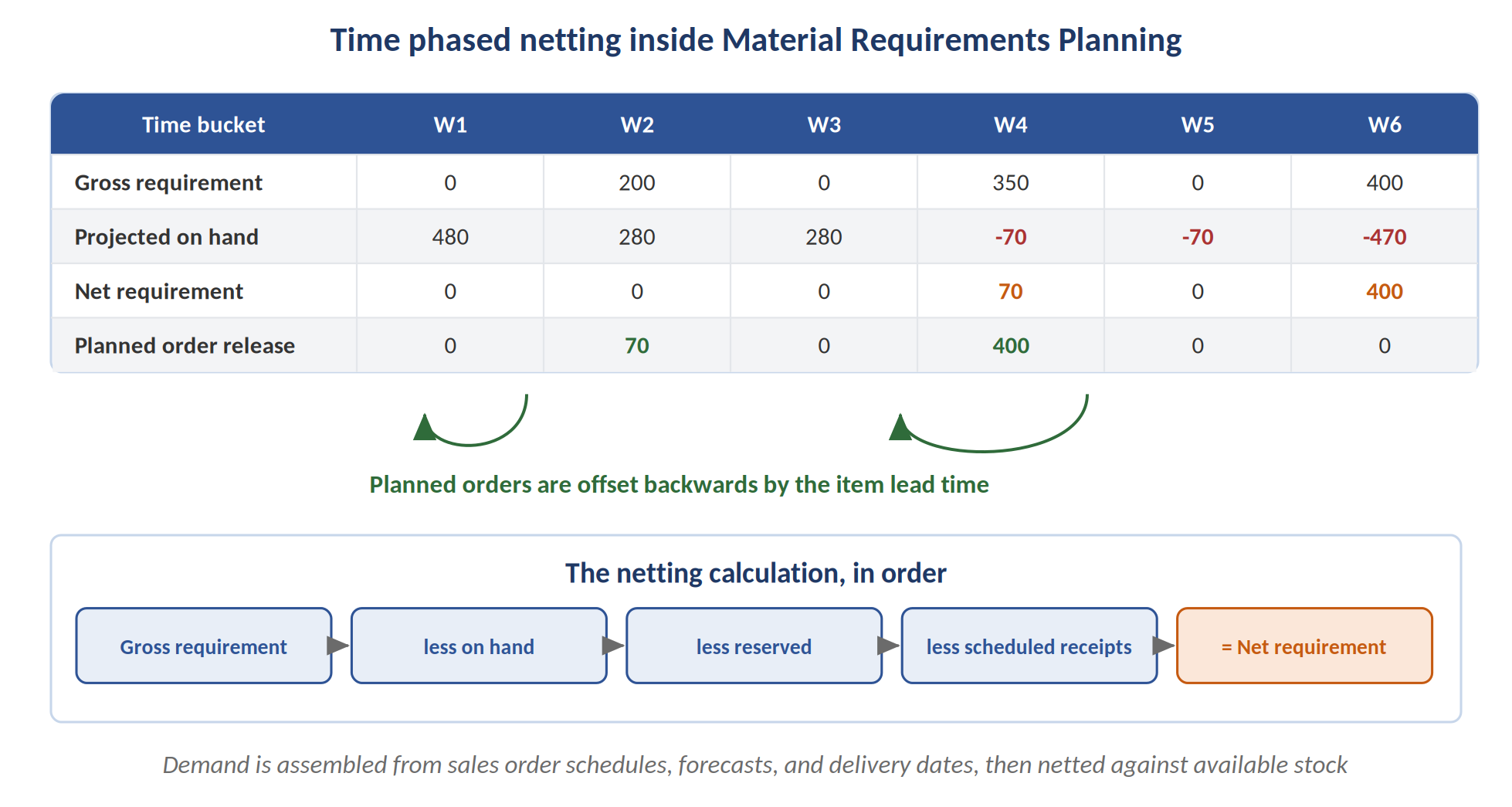
Material planning was previously buried inside the Production Plan and driven only by Sales Orders or Material Requests. That made genuine MRP awkward and close to useless for medium-term planning.
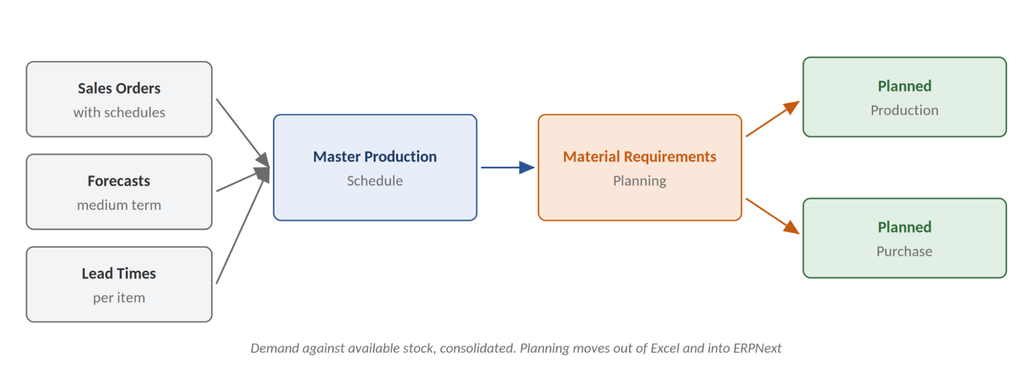
Version 16 introduces dedicated Master Production Schedule and Material Requirements Planning views. These calculate upcoming production and purchase requirements from sales order schedules, blending forecasts, delivery dates, and lead times into a consolidated picture of demand against available stock.
For a manufacturer that has been running planning in Excel alongside ERPNext, this is the feature that closes the gap.
2. Inward Subcontracting
Almost every ERP supports outward subcontracting, where you send raw material to a job worker. Very few support the reverse.
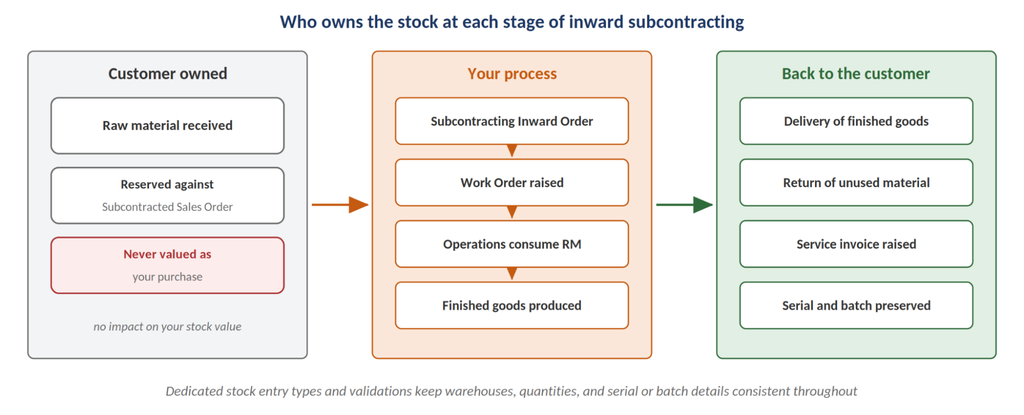
v16 introduces Subcontracted Sales Order and Subcontracting Inward Order documents. You can now receive customer-supplied raw materials, reserve that stock, launch work orders, manufacture finished goods on the customer’s behalf, and track the return or delivery of those goods along with the related invoices. Dedicated stock entry types and validations keep warehouses, quantities, and serial or batch details consistent through the flow.
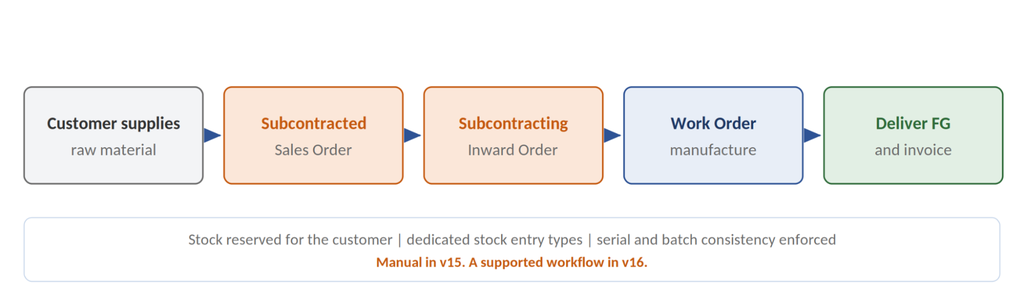
The capability technically existed in v15, but the process was manual and fragmented. In v16 it is a supported workflow. For job work in heavy Indian manufacturing, this is significant.
3. Serial and Batch Traceability Report
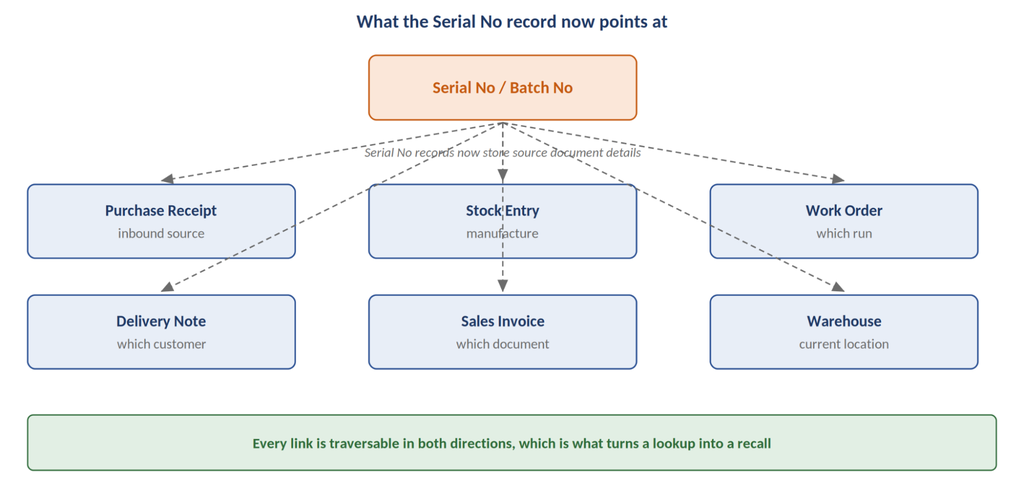
When a customer complaint arrives, the first question is always which batch the product came from, and the second is where else that batch went.
The new Serial No and Batch Traceability report lets you trace backward to the raw materials and batches consumed in a product and forward to every customer and location that received it. Serial No records now store source document details, so the report links straight back to the originating transactions.
For anyone operating under a quality management system or facing a recall scenario, this single report justifies the migration.
4. Stock Reservation across the production chain
Reservation logic has been extended well beyond sales orders:
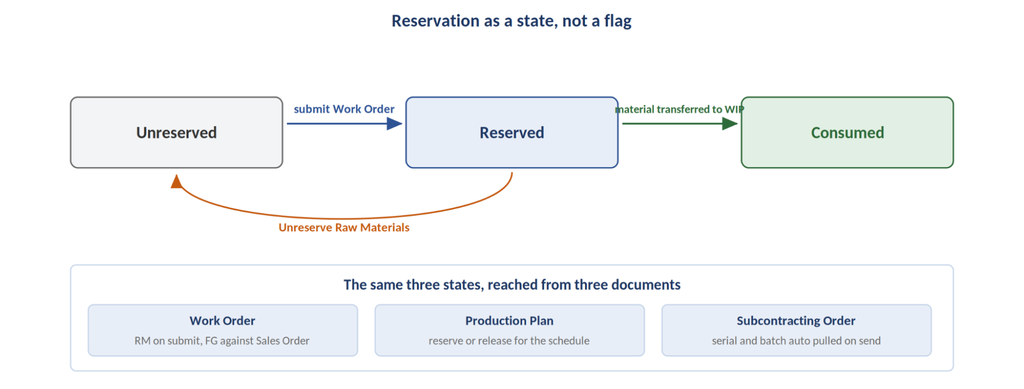
- Work Order: Raw materials are reserved on submission, and finished goods are held against the linked Sales Order after manufacturing. An “Unreserve Raw Materials” action releases them when required.
- Production Plan: Required materials can be reserved or released so they remain available for scheduled production.
- Subcontracting Order: Stock Reservation button reserves or releases raw materials, and the subsequent “Send to Subcontractor” entry automatically pulls in the reserved serial or batch numbers.
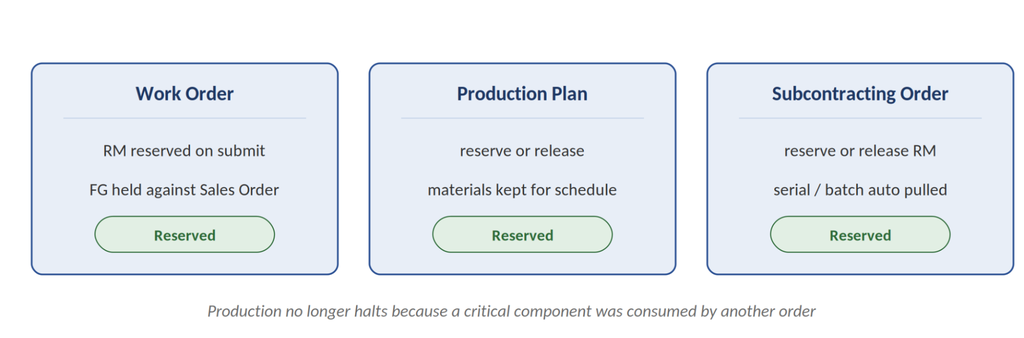
4.The outcome is straightforward. Production no longer halts because a critical component was quietly consumed by another order.
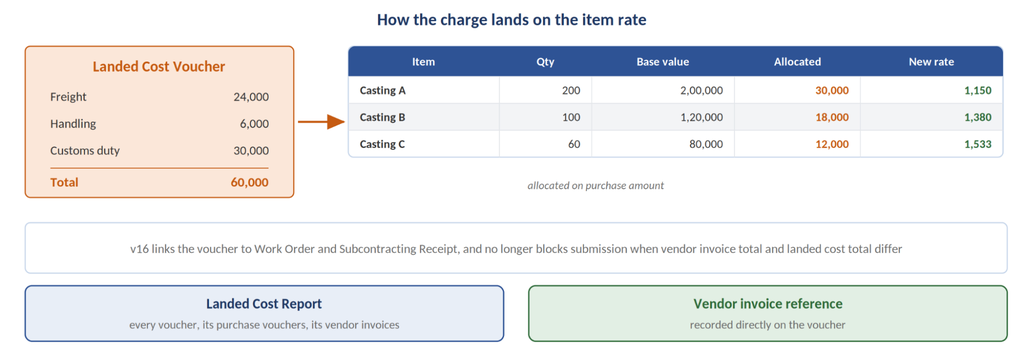
5. Landed Cost Voucher for Subcontracting Receipt and Work Order
Freight, handling, and duties frequently surface after subcontracted goods have already been received. If those charges cannot be applied retrospectively, product valuation is simply wrong.
v16 allows Landed Cost Vouchers to be linked to both Work Orders and Subcontracting Receipts, so additional charges become part of the finished item’s cost. A new Landed Cost Report lists each voucher with its linked purchase vouchers and vendor invoices, and vendor invoices can now be referenced directly on the voucher. Submission is no longer blocked when the total vendor invoice cost and total landed cost differ.
6. Job Card, BOM, and shop floor improvements
- Job Card operations now record raw materials consumed and semi finished or finished goods produced at each operation stage. For outsourced operations, a Subcontracting Purchase Order can be raised directly from the Job Card.
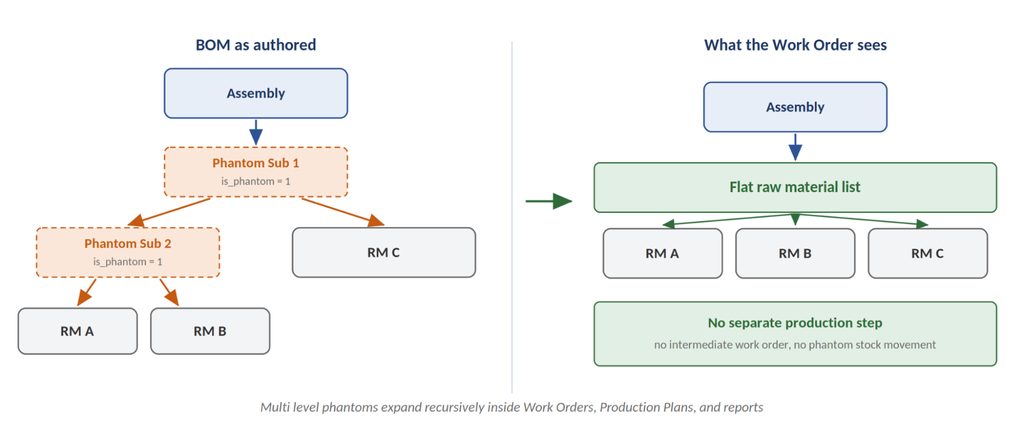
- BOM gains an Is Phantom BOM setting. Phantom assemblies, including multi level ones, expand into their raw materials inside Work Orders, Production Plans, and reports without generating separate production steps.
- Manufacturing Settings adds a Transfer Extra Raw Materials To WIP percentage, allowing extra material movement against a Work Order after the required quantity has already been transferred.
- Default manufacturing warehouse settings have moved from Manufacturing Settings to Company, so each company in a group can define its own.
- Material Request gains a Subcontracting purpose, from which a subcontracted Purchase Order can be generated that pulls the service item from the linked BOM.
- A dedicated Subcontracting workspace, with its own sidebar, now sits alongside a Subcontracting section in the Manufacturing workspace.
ERPNext v16 Stock, Sales, and POS Updates
Stock and inventory
- The stock valuation method can be set per company, falling back to stock settings where no company-specific choice exists.
- The company gains a setting to track inventory value by item or item group rather than by warehouse, with a matching inventory account field on the item.
- Stock Reconciliation displays a read-only Stock UOM column against each item row.
- UOM records gain Symbol, Common Code, and Description fields, created automatically during setup, with names stored in English and displayed in the user’s language.
Sales and CRM
- Delivery Notes created from a Sales Order support a cutoff date selector, with a default cutoff option in Selling Settings.
- Sales Order and Quotation buttons on the Customer form open a pre filled document without leaving the page.
- UTM Campaign, UTM Source, UTM Medium, and UTM Content fields replace the older Campaign and Source fields on transactional documents.
- The CRM Activities panel now shows completed tasks and past events alongside open items.
- A new default Sales Invoice print format carries the company letterhead and a detailed tax breakdown.
- Customer records can hold Supplier Numbers, and Supplier records can hold Customer Numbers, capturing the reference numbers each partner assigns to you per company.
Point of Sale
- Accounts Settings adds a “Use Sales Invoice in POS” switch. When enabled, POS creates Sales Invoices directly, updating stock and accounts at the moment of sale.
- POS Profile supports Allow Partial Payment, with a Collect Outstanding Amount dialog for the balance.
- A list style item selector appears when Hide Images is enabled, keeping long item names fully visible.
- The POS invoice form is reorganised into Payments, Address and Contact, Terms, and More Info tabs.
Frappe Framework v16: The Performance Story
ERPNext runs on the Frappe Framework, and the framework release is where the speed comes from. Frappe has cited roughly twice the performance of the previous version, built on contributions from more than 750 developers.
The changes users will notice immediately:
- Redesigned workspace. Workspaces open with a sidebar, related items are grouped, and icons can be reordered and searched. Navigation feels closer to the older, more structured desktop view that long-time users remember from version 7.
- Horizontally scrollable list views. You can add as many columns as you need and scroll sideways. The old constraint of a handful of columns, with truncated headers, is gone.
- Scrollable child tables with sticky columns. Child tables were previously capped at around ten visible columns. Now you scroll left and right while pinning the fields you need to keep in view.
- Custom print formats for reports. Report print formats can be built entirely through the desk interface, with no custom app and no deployment.
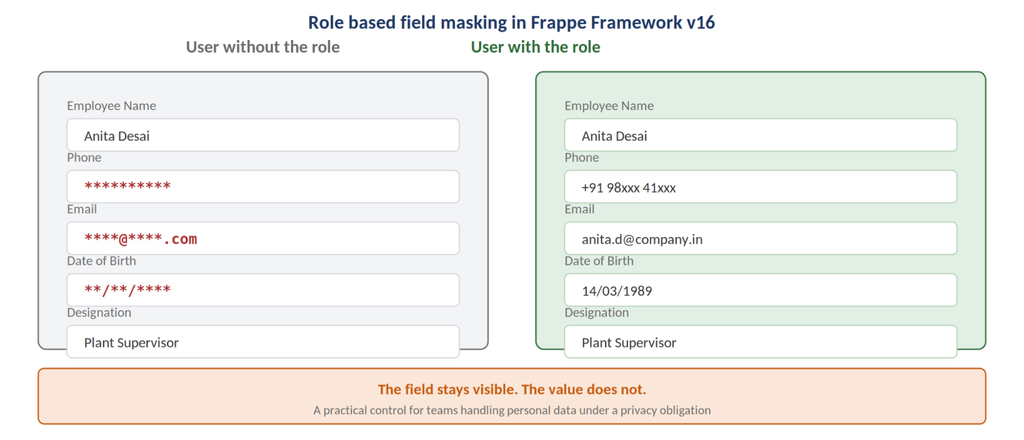
- Role-based field masking. Sensitive fields such as phone numbers, emails, or dates can be masked with placeholders for users lacking the required role. The field is visibly present; the value is not. This is a meaningful compliance capability for enterprises handling personal data.
- Chrome-based PDF converter. PDFs are generated using Chrome rather than wkhtmltopdf, so modern CSS, including flexbox, renders correctly and generation is faster. The preferred generator is selectable.
Smaller additions include SQLite support, background report download, custom permission types, and an awesome popup bar.
Frappe HR v16: Payroll and Workforce Updates
For clients running HR and Payroll on the Frappe stack, v16 concentrates on the workflows that generate the most manual correction work.
- Overtime management. Overtime is calculated automatically from employee check-in and check-out times, mapped to shift-specific overtime types, and processed through overtime slips. Approved slips generate additional salary entries directly in payroll.
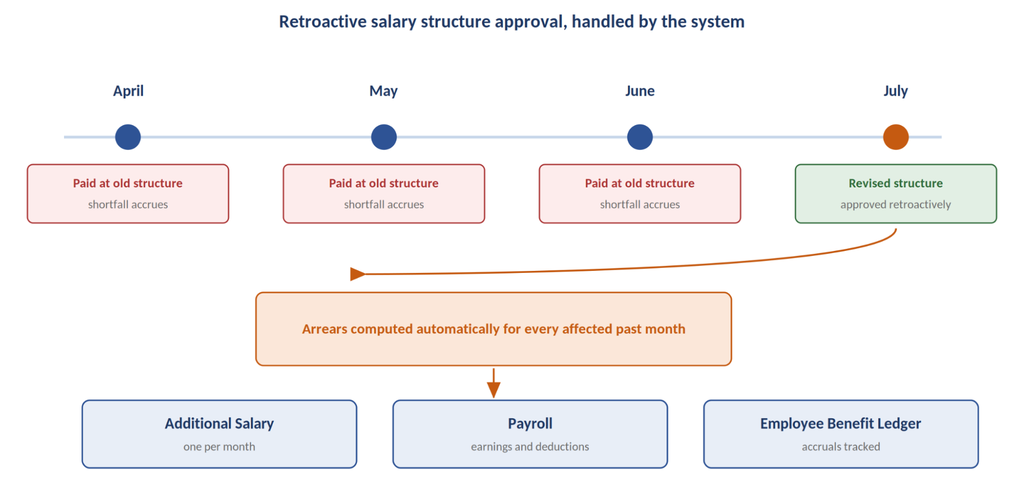
- Arrears and loss of pay correction. When a salary structure assignment is approved retroactively, the system computes arrears automatically and posts additional salary entries for the affected past months, with earnings, deductions, and accruals tracked in payroll and the Employee Benefit Ledger.
- Multi-currency expense claims and employee advances. Amounts are converted, exchange rates tracked, and gains or losses posted to accounting. Multiple payments against a single advance are tracked.
- Flexible employee benefits. Employees select from the perks their employer offers. Benefits accrue each payroll cycle or are claimed on demand, with payouts and accruals recorded in the Employee Benefit Ledger.
- Leave adjustment. HR can increase or reduce allocated leave directly from an existing leave allocation, and a Leave Adjustment record is created automatically.
- Earned leave schedule. Earned leave is credited automatically against your policy and schedule, with successful credits highlighted and failures flagged for a one-click fix.
- Holiday List Assignment. Multiple holiday lists can be assigned to employees or the company, historical records are preserved, and leave calculations always reference the correct holidays. Half-day holidays are now supported and treated distinctly from full-day holidays.
Also included: half-day attendance status, automatic update of last check-in sync, employee check-in status, and an income tax breakup on the salary slip.
Under the Hood: The Performance Improvements That Do Not Make the Headlines
These will not appear in a sales deck, but they are the reason large deployments should pay attention.
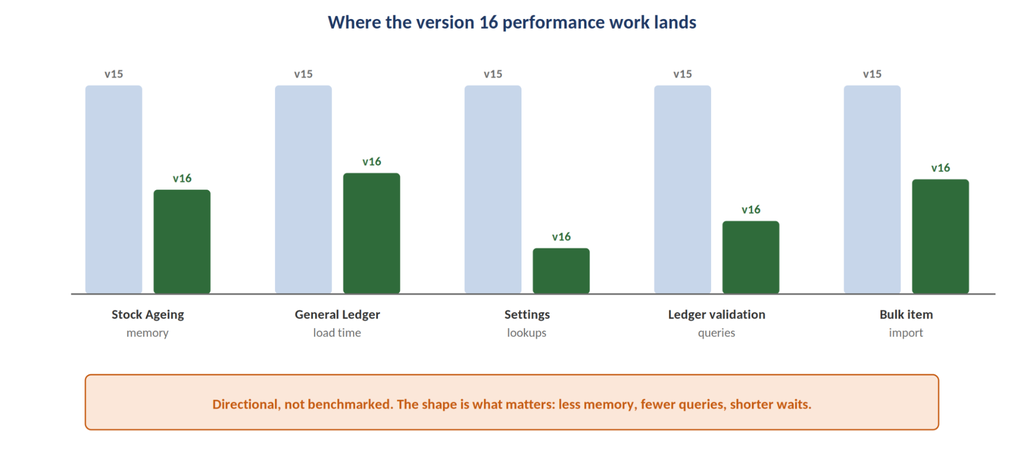
- Budget checks, pricing rules, and stock quantities are cached, so accounting and stock documents save faster.
- Settings doctypes, including Stock Settings, Accounts Settings, and Selling Settings, are read from cache rather than the database.
- The Stock Ageing report uses roughly fifty percent less memory and streams stock ledger entries row by row, so it survives very large datasets.
- The General Ledger report loads considerably faster on high transaction volumes.
- GL Entry, Stock Ledger Entry, and Payment Ledger Entry validations run fewer database checks, verifying any ongoing deletion task once per request instead of once per entry.
- Periodic background tasks moved to a maintenance queue and now run at staggered times, easing the load spike at midnight and on the hour.
- Reposting of Purchase Receipt, Stock Entry, and Subcontracting Receipt documents skips unnecessary budget checks.
- Item detail retrieval uses cached information and skips redundant UOM checks.
- Large stock reconciliation entries and bulk item imports are both created and submitted faster.
Version 16 also introduces version-specific deprecation alerts. When you use a feature scheduled for removal, ERPNext tells you exactly when that feature becomes an error and when it will disappear, escalating from warning to error as the date approaches. This is the first release that makes forward planning around deprecations practical.
Should You Upgrade to ERPNext v16 Right Now?
Frappe’s own position is that there is no rush. Automatic updates will not be pushed for at least six months from release, and most customisations will carry across with only small adjustments.
Our position, as an implementation partner who has migrated production systems across several major versions, is more specific.
Upgrade sooner if:
- You are a manufacturer who needs genuine MRP, inward subcontracting, or serial and batch traceability. These are not backportable.
- Your finance team is maintaining custom financial statements as code. Financial report templates will retire that maintenance burden.
- You operate multiple companies and consolidate financials across currencies.
- Your instance has grown to the point where reports time out or background jobs collide.
- You have compliance obligations around masking sensitive personal data.
Wait if:
- You are midway through a critical implementation phase or a statutory audit.
- You depend heavily on custom apps that have not yet been tested against v16.
- Your team lacks the bandwidth for a proper user acceptance testing cycle. An upgrade without UAT is not an upgrade; it is a gamble.
One point deserves emphasis. The Frappe framework should be updated alongside ERPNext v16. The two are versioned together, and running mismatched versions is the fastest way to discover which of your customisations were relying on undocumented behaviour.
ERPNext v15 to v16 Upgrade Checklist
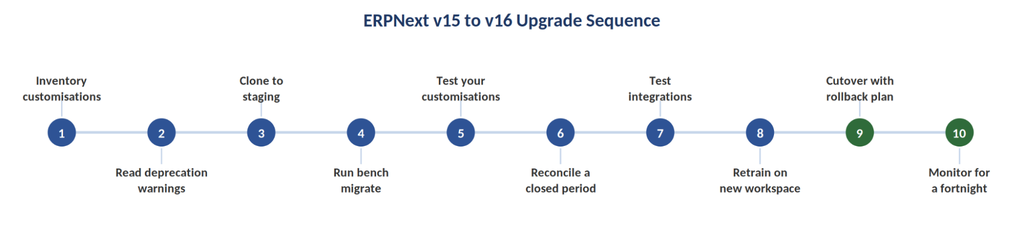
A pragmatic sequence, drawn from how we run these migrations:
1. Inventory your customisations. List every custom app, custom script, server script, custom field, and custom print format. This document is the backbone of the entire upgrade.
2. Read the deprecation warnings on your current instance. v16 flags features scheduled for removal. If you are on a recent v15 build, some of these signals are already visible.
3. Clone production into a staging environment. Never test against live data on live infrastructure.
4. Run the migration on staging. Update Frappe Framework and ERPNext together, then run bench migrate and review every patch that fails.
5. Test the customisations, not the standard features. Frappe tests the standard features. Nobody but you tests yours.
6. Validate financial reports against a closed period. Run Trial Balance, Profit and Loss, and Balance Sheet for a completed month on both versions and reconcile to the rupee.
7. Test the integrations. Payment gateways, e invoicing, e way bill, bank feeds, and any external system pulling from the API.
8. Retrain on the new workspace. The Framework v16 desk looks different. Ten minutes of walkthrough saves a fortnight of support tickets.
9. Schedule the production cutover with a rollback plan. Take a verified backup, agree a go or no go checkpoint, and know exactly how you revert.
10. Monitor for a fortnight. Watch background job queues, error logs, and report execution times.
What This Means for Growing Businesses in India
HR and Payroll receive several workflow improvements, including:
- Automatic Overtime Management
- Payroll Arrears
- Multi-Currency Expense Claims
- Flexible Employee Benefits
- Leave Adjustments
- Earned Leave Scheduling
- Holiday List Assignment
- Half-day Attendance
- Income Tax Breakup in Salary Slips
Under-the-Hood PerformMost Indian SMEs adopting ERPNext are replacing a patchwork of Tally, spreadsheets, and standalone tools. For that profile of buyer, version 16 changes the calculus in two specific ways.
First, the manufacturing depth has caught up with the marketing. MRP, inward subcontracting, phantom BOMs, and stock reservation across the production chain move ERPNext from “capable with customisation” to “capable out of the box” for a large class of engineering and job work businesses.
Second, the financial reporting flexibility removes a recurring implementation cost. Templates replace code, which means your statutory formats, your management reporting pack, and your auditor’s preferred layout are configuration decisions rather than development tickets.
The performance work is the quiet third factor. It is the difference between an ERP your team tolerates and one they actually open on a Monday morning.
How Hybrowlabs Can Help
We are a Frappe partner based in Pune, and we have been implementing ERPNext, Frappe CRM, and Frappe LMS for manufacturers, distributors, service firms, and non profits across India and the Gulf.
For version 16 specifically, we support:
- Upgrade assessment. A structured review of your current instance, custom apps, and integrations, with a risk rated migration plan.
- Staged migration and UAT. Staging build, patch resolution, reconciliation of financial reports, and a managed cutover.
- Fresh v16 implementations. New deployments on version 16 from day one, configured for your industry.
- Custom development on Framework v16. Custom doctypes, reports, print formats, and integrations built on the current framework.
- Post-upgrade support. Ongoing AMC and functional support once you are live.
If you are weighing an ERPNext v16 upgrade or evaluating ERPNext against your current system, we are glad to walk through it with you. Reach out for a no-obligation assessment of your instance and a realistic view of effort, timeline, and cost.
Frequently Asked Questions
When was ERPNext version 16 released?
ERPNext v16.0.0 was released on 12 January 2026, roughly two years after the previous major stable release. The version 16 branch has continued to receive fixes and refinements since.
How many new features are in ERPNext v16?
Frappe cites more than fifty new features, contributed by a community of over six hundred developers, alongside a large body of performance and refactoring work.
Will my ERPNext customisations work in version 16?
Most will carry across, though some require small updates. Custom apps, server scripts, and print formats should be tested on a staging instance before any production migration.
Do I need to update Frappe Framework alongside ERPNext v16?
Yes. Updating the Frappe Framework together with ERPNext v16 is required for full compatibility across features, APIs, and customisations.
Is there a deadline to upgrade to ERPNext v16?
No. Frappe has indicated that automatic updates will not be pushed for at least six months following the release, so you can plan the migration around your own operational calendar.
What is the biggest reason to upgrade to ERPNext v16?
It depends on your business. Manufacturers upgrade for MRP, inward subcontracting, and serial and batch traceability. Finance teams upgrade for Financial Report Templates and the Consolidated Trial Balance. Large instances are upgraded for the performance improvements.
Hybrowlabs Technologies Pvt Ltd is a Frappe partner delivering ERPNext, Frappe CRM, Frappe LMS, and custom Frappe application development from Pune, India.
Chinmay Kulkarni
Hi, thanks for coming here. I am the director of Hybrowlabs Technologies, a web, and mobile development studio based out of Pune, India. Leading passionate full-stack developer team to build great mobile and web app experiences. We love to build beautiful apps, would probably keep doing it all my life 😅
No comments yet. Login to start a new discussion Start a new discussion