Powering India's UPI Revolution with Apache Flink: Real-Time Fraud Detection at Scale
A one-minute fraud signal with Apache Flink, and how to operate it with OSS Manager.
Six payments at the same shop could be a customer splitting a bill. Six payments from Pune to Chennai in 40 seconds tell a different story. The important question is not just how many payments arrived, but whether one person could have been present at all six terminals.
Where Apache Flink fits in UPI payments
UPI handled 24.51 billion transactions in August 2026, up from 20.01 billion a year earlier, according to NPCI. That is about 22% growth in a year. For a bank, the hard part is not counting payments nationwide. It is recognising an unusual sequence for one payer without asking the ledger to reconstruct the last minute on every request.
The same payment event can answer different questions. Has a pending debit settled? Is a UPI Lite balance running low? Are failures rising at one gateway? Flink can join requests to confirmations, track spending for a replenishment reminder, or alert operators to a spike in failures. None of those jobs changes the customer’s balance. Fraud detection asks a different question: could these payments all be genuine?
When a burst deserves a second look
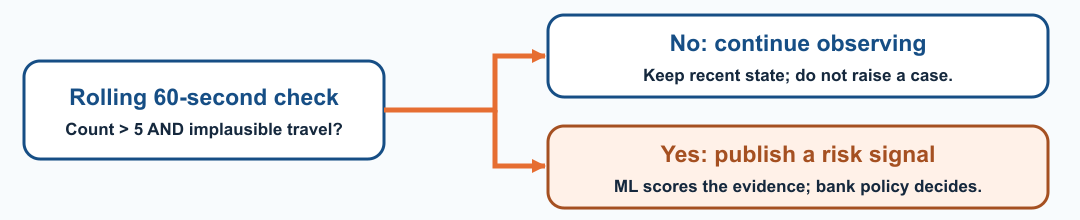
In this illustrative rule, more than five distinct in-person payments by one tokenised payer in a rolling 60 seconds trigger a location check. A sixth payment at the same shop is not enough. Two trusted terminal locations too far apart for the elapsed time create a candidate for fraud scoring.
| Count payment IDs, not messages. Compare terminal locations, not merchant head offices. |
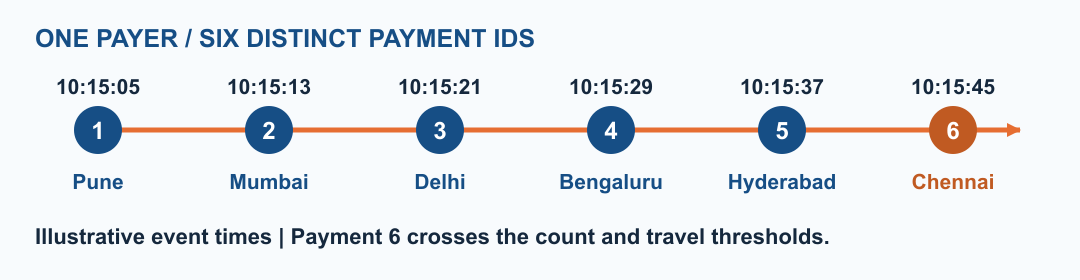
At 10:15:45, the Chennai payment arrives. Flink groups it with the same payer’s five earlier payments and checks the preceding 60 seconds using transaction timestamps. It need not wait until 10:16. A retried message is still one payment; a merchant’s registered address is not proof of where the payer stood.
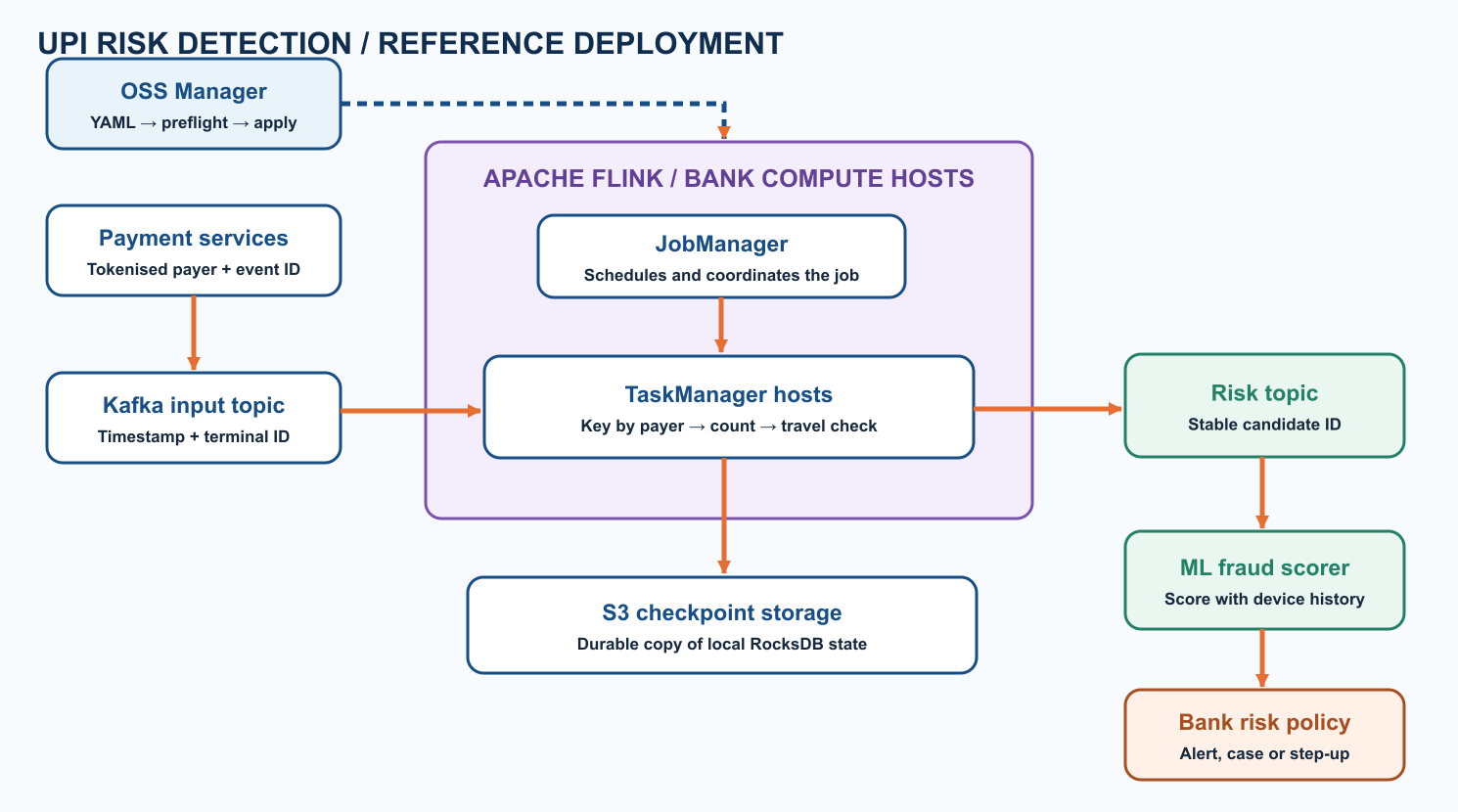
Deployment architecture: Apache Flink with OSS Manager
Follow the solid arrows from the bank’s payment feed. Flink publishes a candidate to Kafka so the ML scorer can evaluate device history without blocking payment authorisation. The bank’s risk policy decides whether to notify an analyst, open a case or request additional verification. The dashed arrow shows management, not payment traffic.
What OSS Manager changes for the bank
The fraud team owns the rule, the training data and the decision to act. The platform team owns the Flink hosts. OSS Manager lets that team review the topology, Java and runtime package, TaskManager slots and recovery storage in one deployment plan. After apply, check registered workers and available slots, then trace a payment all the way to a case. A healthy process alone is not evidence that a reviewer received anything.
Three checks before the first live alert
| Rehearsal Send or change Evidence to retain | ||
| False positive | Six payments, one terminal; then replay payment six. | No travel alert; the replay does not increase the count. |
| True candidate | Replay the six-city sequence from Pune to Chennai. | One candidate reaches the scorer with six distinct IDs and their terminal observations. |
| Recovery | Restart a worker after a checkpoint; replay the boundary events. | The restored job produces the same case ID. The case system does not open a duplicate. |
A shorter path to the next rollout
When the pilot moves to the next environment, the platform team changes the host inventory and capacity settings rather than writing another installer. The fraud team replays the same six payments and checks that one case arrives. Time from an approved configuration to that first verified case is a useful measure of rollout speed; alert latency and false positives measure whether the workload itself is ready.
| The acceptance test ends at the case queue, not at the Flink dashboard. |
Source: NPCI, UPI Product Statistics, August 2025 and August 2026: NPCI UPI Product Statistics. The payment sequence is illustrative, not a reported customer incident.
No comments yet. Login to start a new discussion Start a new discussion